Info Filled Icon
George Vondriska

Router Table Setup Using Test Cuts for Perfect Dadoes

George Vondriska
Duration:   11  mins

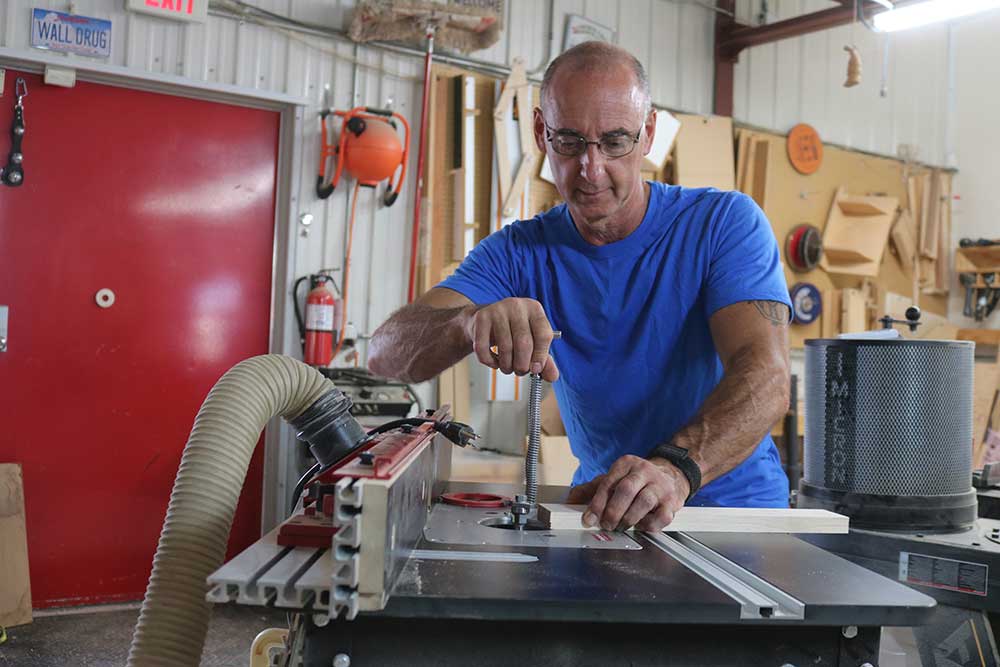
Dado joints are a time-honored approach for case joinery. When choosing to use a router to create this joint, router table setup is critical to creating the perfect fit that you’re after. On a table saw equipped with a dado head, you would use shims to dial in the perfect width for your dado, but shims aren’t an option with router bits. On the router table you’ll use a bit smaller than the required dado and make multiple passes.

Before beginning your router table setup, you’ll want to be proficient in how to use a router, as you’ll need for that to be second nature during your joinery operations. You’ll also want to be sure that you are confident in knowing how to install a router bit in the proper fashion. With those pre-requisite skills in your arsenal, you’re ready to begin your joinery operations.

Choose the right bit

It’s important to choose a bit that is large enough to make the joint in two passes, but small enough so that you have ample adjustability.

Router table setup

Take your time when setting up for your cut. Position the fence and the height of the bit carefully so that your dado or groove will come out perfect. And most importantly, test your router table setup with some scrap wood so that you can visually verify that everything is configured properly to product the perfect grooves or dadoes.

Share tips, start a discussion or ask other students a question. If you have a question for an expert, please click here.

Make a comment:
characters remaining

4 Responses to “Router Table Setup Using Test Cuts for Perfect Dadoes”

  1. Jason

    When I've adjusted the fence, I ended up with a loser dado then I intended. Watching this where you moved just the in-feed side of the router table. This makes perfect sense. Resulting in a much better dado. Great vid. Thank you.

  2. Stephen

    I am about to start working on a project to build a bathroom vanity and plan on using a CNC ShopBot for breaking down my sheet goods. I had planned to also do all the joinery work at the same time but after watching some of these videos I question if I should. I will be using pocket holes/screws so does the precision of the dado need to be this accurate?

  3. Charles

    How do you insure that your router fence is always 100% straight when moving it so often? I have a high quality router table but am unsure until I line it up with a tsquare or other straight edge. Thanks!

  4. John

    George is a good teacher. The WWG site sucks. Why? Video frequently stop streaming and why do we have to watch commercials after paying for premium content?

I've got two pieces and I'm going to join them just like that by putting this piece into a groove and the other piece and the router table provides a great way to do that. Now, groove or data, the technique is going to be the same. Couple of things are key to this. One is the size of the router but we're going to use routers unplugged so we can have a close look here. We want the diameter of the cutter to be slightly more than half the thickness of our material.

In this case three quarter inch stack means half as three eighths. I'm using a half inch router but now what we don't want is to try to just go ahead and match three quarter, inch, bit to three quarter inch stock, because if the stock thickness isn't a perfect three-quarter and the bid isn't a perfect three quarter. We're not going to have a good joint. It's better to do this in two passes to do it in two passes we have to have a cutter smaller than the thickness of our material. Now let's say the only bit I own is a five sixteenths cutter.

We could do that. It's just going to take more passes. We can't do it in two. You have to do it in three or four in order to get that to work. First step in this process set the height of your router bit, typically for data's and grooves like this, it's a quarter inch or three eight seven inch and three quarter inch stock.

Next step set the fence location. The fence location is going to be face of the fence to the edge of the data is what's locating the data. We're groove. Now, an important thing when we do this is we want to have some test pieces. In addition to our project pieces that we make this first cut in.

So what I'm about to do is I'm going to cut this then I'm going to flip it and I'm going to cut again because this is my test piece. So I want to have multiple grooves I can work with to do my test cuts on. Then I'm going to do that to my additional pieces as well. So we can treat those like our test and project pieces. I'll make more sense as we pull this together.

So we're ready for our first cut, plugged the router in When I was fidgeting with that one piece I could see when I put the material against the fence there was a gap between the edge and the fence that told me there was some sawdust in between the two and that's going to affect that data or groove location. So if you see that you got to take the time to get rid of it. Next step is the most important part of this whole process. And that has to do with, in order to widen the groove of the data, which way do I move the fast two options? I can move it away from me so that my next cut routers already unplugged.

If I move it away from me the next cut is going to be on this side of the groove. If I move the fence toward me the next cut is going to be on this side of the groove. The router bit has spinning counter-clockwise. So the problem I'm going to have if I move the fence toward me is that the router bit is going to grab that stack. And it's probably going to throw it right off the router table.

Some very dangerous possibly pull your fingers toward the router bit with it. It's imperative that when we do this next step of widening the groove, the fence goes that way. So the cut is on this side. So we're working against the direction of rotation. Well, we need to know next is where do we move the fence to?

So I'm going to take my material And I'm going to set it on the groove. And then I'm going to make a Mark. And that's going to show me the location for the cut. I'm going to do that up here, where I can see it better. That gives me that Mark.

Now don't try to go to that Mark on your first pass. Cause if we over cut it, we're going to be in trouble. If we over cut it, then this piece is firewood. We can make the group bigger by moving the fence and increments. We can't make the groove any smaller.

So by picking the piece up, I'm setting it on top of the router bit. And this is a great way to check visually. There's the tip of the cutter. There's the pencil line. It looks like I'm short of my location.

So let me grab one of my test pieces and we'll try this. I'm only going to do this cut now in one groove I don't need to do any cuts in these other groups. I only got to work on one of them. Then once we know that's right, we'll move on from there. So fence moves away from me.

I already did that. Plugged the router in. Let's give her a try And two on this piece, just to optimize my test pieces. I made two first cuts. So then I can work from both edges as I'm doing tests here.

All right. Get some sawdust out of there. The piece we're trying to fit. I think that's not going to go in and it's not. The groove is still just a tiny bit too narrow.

What I'm looking for is a fit where this will push in with just hand pressure. You don't need a mallet but once it's in there, they'll stay stuck together. Now to keep track of my incremental moving of the fence I'm going to make a Mark on the router table. I'm just tracing the fence make a Mark on the router table, tracing the fence. That gives me a great visual on how much change I'm affecting right now on the fence going to move and just tiny increments.

And we're going to sneak up on a perfect fit. Okay? Yeah. And I'm looking for any junk that might affect my cut. That looks okay.

Closer, but not there yet. wants To go in there just to little smidge, more So now we've got to fit slips in with hand pressure, stay stuck. Now a couple of scenarios. We can now take our rest of our pieces and just do this last pass and we should have the fit that we want. Let's see what we got there.

There we go. If I put it in straight. So what I really want you to get out of this is we only have to do those multiple test passes to that first test piece. Then we can come back to our project pieces, do the second pass and we should be right there for the fit. Now, if you over cut, if I make the groove too wide by doing my test passes, which I've done that's why we want to have multiple test pieces.

Cause I've got to be able to come back to a ground zero point to move my fence and start on those test cuts again. So make sure you've got multiple test pieces to pull this off, make sure you're taking the material off the correct side of the groove to keep it safe make sure your router bits, the right size. And this technique on the router table is a way that you can get perfect sized grooves.

Get exclusive premium content! Sign up for a membership now!